Running Start How to Apply & Enroll
Earn tuition-free college and high school credit at Olympic College.
Application Instructions
Applying to Running Start is a multi-step process. First apply to Olympic College and email required documents to our office; then complete the enrollment steps listed below and in the acceptance email that was sent to you.
(Complete steps 1 & 2 to meet deadline.)
- Step 1: Apply to Olympic College
- Step 2: Email Required Documents
- Step 3: Plan Your Class Schedule
- Step 4: Meet with High School Counselor
- Step 5: Email RSEVF to Running Start Office
- Step 6: Attend Running Start Orientation & Advising Session
- Step 7: Pay Fees, Buy Books, Attend Classes
Helpful Resources
Helpful Resources
Step-by-Step Instructions

1 Apply to Olympic College
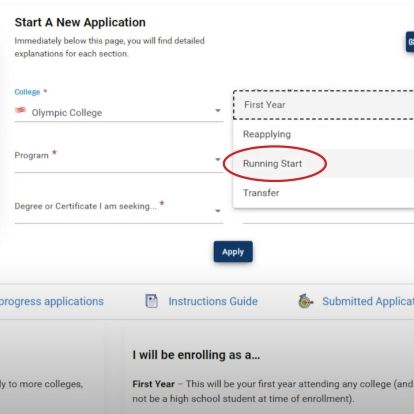
- When completing the OAA, you must use your legal name. Later, you will be able to add a preferred name in ctcLink.
You will receive a ctcLink Student ID number from the OC Admissions office with your next steps.
Visit our 'How to Apply' to Olympic College webpage for helpful information and instructions.
Click if you've completed this step.

2 Email Required Documents
Email the following documents to @email.
- High school transcript (Home school students should submit letter of recommendation from their home school teacher if there isn't a home school transcript available.)
- Accuplacer scores, if needed.
Click if you've completed this step.

3 Plan Your Class Schedule
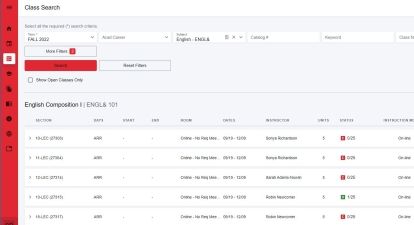
After being accepted to OC, complete all of these enrollment steps, which are also listed in your acceptance email.
- Review class options using the ctcLink Class Schedule.
- Log in to Class Schedule and add to shopping cart (note: this does not enroll you into those classes).
- Select classes that meet high school graduation requirements and your academic goals.
Click if you've completed this step.

4 Meet with High School Counselor
- Select classes that meet high school graduation requirements.
- Together complete the Running Start Enrollment Verification Form (RSEVF).
- Parent and counselor signatures are required on the form (electronic signatures acceptable).
- Ask for a transfer guide listing OC classes that meet high school requirements.
Click if you've completed this step.

5 Email RSEVF to Running Start Office
- Email your RSEVF to @email. (Must be sent prior to scheduling Running Start New Student Orientation & Advising Session.)
Click if you've completed this step.

6 Attend Running Start Orientation & Advising Session
- Email your RSEVF to @email, complete with required signatures, at least one week prior to your orientation (should be emailed prior to scheduling).
- Attend Running Start New Student Orientation where you will learn about college resources, procedures, faculty expectations.
- During orientation you will receive advising and enroll in your classes.
Click if you've completed this step.

7 Pay Fees, Buy Books, Attend Classes
- Pay all fees to the Cashier's Office or through ctcLink Student Self-Service Portal by the Friday before the quarter begins.
- Visit the OC Bookstore online to view required textbooks.
